Track Any Phone
Family Locator AppsTravel & Local
4.51.50K Reviews
- Version
- 3.5.5
- Installs
- 10.00M
- Age Rating
- Everyone
Screenshots
Our Review of Track Any Phone
 Analysis by Appyee
Ever been in a situation where you needed to know the whereabouts of a family member or friend, just to make sure they’re safe? Well, I stumbled upon this nifty app called Track Any Phone, and it’s been quite an eye-opener. I’ve spent some time playing around with it, and I’m here to spill all the beans on what this app has to offer.
My first-week impression was that the idea is easy to understand: agree on location sharing, then check in when a practical question comes up. That makes this kind of tool most useful when everyone involved wants the arrangement, rather than as a way to monitor someone without their knowledge. I would decide the purpose together first—such as coordinating a pickup or checking that someone has reached a destination—so location access stays tied to a clear need.
For a family, the useful habit is often not watching the map constantly but knowing where to look when plans change. If a teenager is travelling home, for example, a parent can check the shared location instead of sending repeated messages. If the teenager’s phone is offline or the location is stale, though, the map cannot replace a direct call or text. I treat location information as a helpful clue, not proof that somebody is safe or available.
The same distinction matters for friends. A group meeting across town may benefit from a shared location while people are on the way, but keeping everyone visible after the meetup has no obvious value. A short, agreed period of sharing is a better routine than leaving tracking on by default. This is also a useful way to avoid turning a convenience into an expectation that friends must always disclose where they are.
Getting Started with Track Any Phone
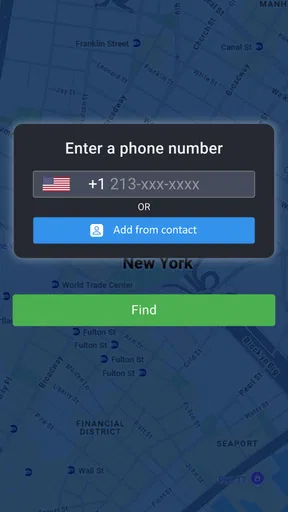
First things first, downloading Track Any Phone is a breeze. It’s available on both Android and iOS, which is great news if you’re like me and have friends using different operating systems. Once you’ve got it on your device, setting it up is as simple as pie. You just need to grant the necessary permissions and you’re good to go.
There is one important practical point behind that easy start: location sharing depends on the people and devices involved being set up to participate. I would confirm that each person understands what is being shared and knows how to stop participating if the arrangement changes. That small conversation helps prevent confusion later, especially in a family where one person may assume the app is only being used for a particular journey.
User-Friendly Interface
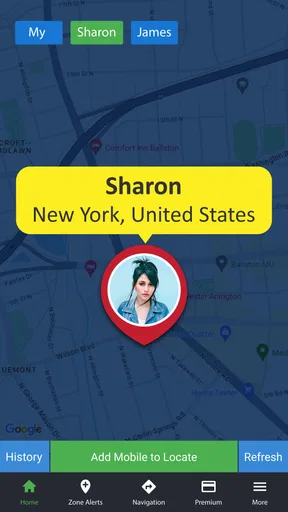
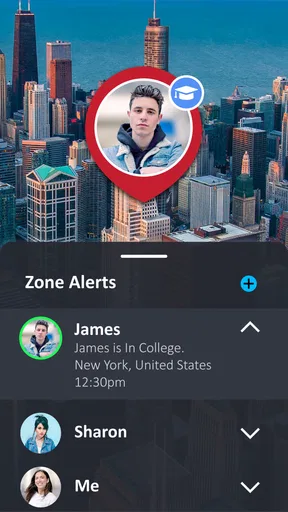
What really caught my attention was the app’s slick and user-friendly interface. It’s intuitive and doesn’t bombard you with unnecessary features. Everything you need is right there at your fingertips. The main dashboard gives you a quick overview of all the devices you’re tracking, and tapping on any of them provides more detailed information.
For everyday use, I would keep the dashboard focused on the people relevant to the current plan rather than treating it as a permanent roster to check out of habit. A quick glance is most helpful when it answers a specific question: has someone started the trip, are they close to the agreed meeting point, or should I call because their progress is unclear? That approach makes the app a coordination aid instead of a source of needless checking.
Features That Stand Out
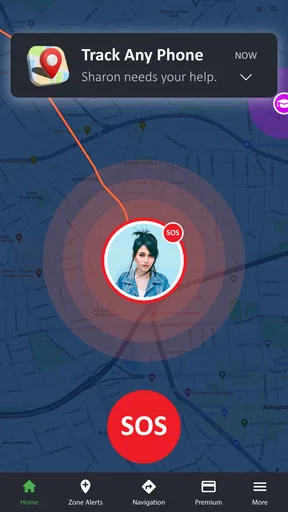
The app isn’t just about location tracking; it’s got some pretty cool features that make it stand out. For starters, it offers real-time tracking, so you can see exactly where someone is at any given moment. This can be a lifesaver if you’re waiting for someone and need to know how far away they are.
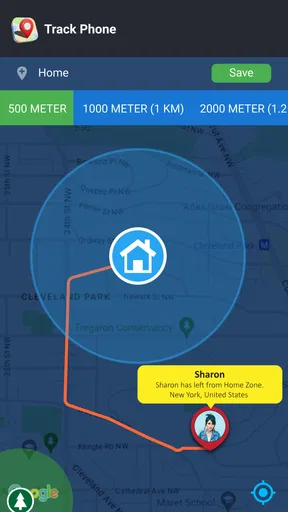
Another feature I found super handy is the geofencing option. You can set up zones on the map, and whenever the person you’re tracking enters or leaves these zones, you get a notification. This is perfect for keeping tabs on kids or ensuring a friend arrives safely at their destination.
These tools work best when used selectively. For a regular school or activity journey, a zone around a destination can answer a useful arrival question without requiring a parent to keep refreshing the map. For a one-off trip, live location may be more relevant than setting up a zone that nobody will need again. I would also make the boundaries meaningful: a broad, practical place is less likely to create distracting alerts than trying to make a zone match an exact doorway or curb.
Notifications are not a substitute for a conversation about what they mean. An arrival alert can tell you that a device has crossed a boundary, but it cannot tell you whether the person is ready, has changed plans, or needs help. If the alert does not arrive, that may be a reason to check in directly, not an invitation to draw a firm conclusion from the map alone.
Privacy and Security
Now, I know what you’re thinking – is this app safe? The developers have put a lot of thought into privacy and security. All data is encrypted, and you can only track someone if they’ve given explicit consent. Plus, there’s a feature that allows users to control when they’re being tracked, so you’re not left feeling like Big Brother is watching your every move.
Even with those protections, I would make consent an ongoing part of using a location app, not a one-time setup step. People’s routines and comfort levels change, and a family member should be able to say that sharing is no longer useful without having to justify it. For children, the conversation can be age-appropriate, but explaining the purpose still helps build trust and teaches that location access is personal information.
It is also worth being deliberate about who gets access. Before adding another person or using a shared device, I would check that the intended group is clear and that everyone understands which location is visible. If the goal is simply to let someone know that a journey has ended, a message or call may be a better choice than ongoing sharing. The app is most defensible when its access matches a real coordination need.
Real-Life Applications
Let me give you a couple of scenarios where this app really shines. Imagine you’re organizing a family reunion and want to make sure everyone arrives on time. With Track Any Phone, you can quickly check who’s on their way and who might need a gentle nudge. Or, perhaps you’re out hiking with friends and get separated. The app makes it easy to find each other without any stress.
A more routine example is a parent collecting a child after an activity. If the pickup time shifts, checking the shared map can help the parent decide whether to wait nearby or send a message. The useful workflow is to agree beforehand that the location will be shared for the trip, then use a call or text if the person is not where expected. That is more reliable than assuming the map will explain every delay.
For a hike, I would treat the app as a convenience for regrouping, not as a safety plan. Remote terrain can make location information less dependable, and phones can run low on battery or lose service. Agree on a meeting point and a fallback plan before separating. The app may help people orient themselves when it works, but it should not replace preparation, navigation basics, or contacting emergency services when needed.
Compared with ordinary messaging, location sharing can reduce the back-and-forth of “where are you?” when several people are travelling to the same place. Compared with a navigation app, its point is not primarily to plan a route or guide a driver; it is to see where a consenting person’s device is. If all you need is to share a meeting point, a pinned location in a message is simpler. If you need ongoing coordination among people who have agreed to share, this app’s tracking approach may be more convenient.
Room for Improvement
While the app is pretty solid overall, there are a few areas where it could improve. For instance, the battery usage is a bit on the high side when real-time tracking is enabled. It’s not a deal-breaker, but something to be aware of if you’re using it for extended periods.
That trade-off affects how I would use live tracking. I would turn to it for a journey where knowing progress matters, then avoid leaving it running just because it is available. If someone expects to rely on their phone for a long day, checking its charge before sharing is sensible. A less frequent check-in by message may be the better option when battery life matters more than seeing movement on a map.
Also, while the app works well in urban areas, it can be a tad glitchy in more remote regions. Hopefully, future updates will address these minor hiccups.
This makes the setting and the surrounding conditions part of the decision. A city trip with familiar streets is a more natural fit for live location than a remote route with unreliable connectivity. If a position stops updating, I would not assume the person has stopped moving; I would contact them through another channel and follow the agreed plan. That caveat is especially important when a group is relying on the app to meet after becoming separated.
The app is free to start, while in-app purchases range from $4.99 to $59.99 per item, so I would explore the basic experience before deciding whether any paid option is worthwhile. It is made by Family Locator Apps, sits in the travel and local category, and is rated for everyone. The current version is 3.4.3, with Android support starting at 6.0. Those details make it accessible to a broad range of users, but they do not change the key question: will your household or group use location sharing often enough to justify keeping it installed?
Its audience is fairly specific. I can see it earning a regular place for a family that coordinates pickups, or for friends who often need to find each other while travelling together. I would skip it if the people involved are uncomfortable with ongoing location sharing, if you only need to exchange a one-time meeting point, or if you expect it to work as a dependable emergency tracker in places with weak coverage. In those cases, a simple message, a phone call, or a dedicated navigation and safety plan is a better fit.
Month-to-Month Value and Maintenance
The novelty of seeing a moving marker fades quickly; what lasts is whether the app removes a recurring bit of friction. I would judge it by asking whether it saves messages during routine trips, makes pickups less uncertain, or helps a group reconnect. If none of those situations comes up regularly, there is little reason to open it just to look at a map. A location tool earns its place through occasional usefulness, not constant attention.
Maintenance is mostly about keeping the arrangement understandable. When a trip or routine ends, revisit who is sharing with whom and whether the original purpose still applies. If someone changes phones or stops appearing as expected, check the setup and contact them rather than relying on an old location. These simple habits prevent an outdated map from being mistaken for current information.
For a household, it may help to make one clear rule, such as using sharing for the trip home or a planned group outing. That is easier to maintain than asking everyone to remember an unwritten expectation. It also gives the person being tracked a predictable boundary and makes it clearer when a direct message is the right next step.
Track Any Phone has a 4.5 average from around 192,000 ratings, with over 10 million installs. Those figures suggest it has reached many users, but popularity is not a substitute for fit. I would base the decision on whether the people you want to coordinate with are willing to participate and whether you can use it without turning each location check into a source of anxiety.
Sources of Fatigue
The main risk is not simply that a map becomes boring; it is that constant access changes how people communicate. A family member may start checking instead of asking, while the person sharing may feel they must explain every stop. Setting expectations early helps keep location sharing practical and prevents ordinary delays from becoming a reason for conflict.
Alerts can also become background noise if they are set around places or routines that do not matter. I would keep only the boundaries that answer a real question, such as whether someone reached an agreed destination, and remove them when the routine changes. Fewer, more meaningful notifications are easier to notice and less likely to make everyone ignore them.
Another source of frustration is expecting a location app to be perfectly current in every situation. Battery use, connectivity, and the limitations of the phone’s location information can all affect what appears. The right response to an unclear location is to verify it with the person, not to treat a dot as a complete account of their movements.
Final Thoughts
Overall, Track Any Phone is a robust app that delivers on its promises. It’s a practical tool for anyone who wants peace of mind knowing where their loved ones are. Whether you’re a concerned parent, a friend coordinating a get-together, or just someone who likes to stay informed, this app is worth checking out.
My recommendation is narrower than “keep it open all the time”: use it when location sharing solves a real coordination problem, and agree on when that sharing should stop. That balance is what makes the app more likely to remain useful after the first-week curiosity passes. For people who value that convenience and are comfortable sharing, it can be a handy part of a routine; for everyone else, a quick message may be simpler and more respectful.
If you’re intrigued and want to give it a try, you can find it on the Google Play Store or the Apple App Store. Just remember to use it responsibly and always respect the privacy of those you’re tracking. Happy tracking!
Verdict
Strengths of Track Any Phone
- User-friendly interface for easy navigation.
- Accurate location tracking in real-time.
- Battery-efficient, minimal resource usage.
- Works seamlessly across multiple devices.
- Customizable notifications and alerts.
Limitations of Track Any Phone
- Requires internet for optimal performance.
- Privacy concerns due to location access.
- Limited features on the free version.
- Occasional delays in location updates.
- Not compatible with older OS versions.
Similar Picks in This Category
View All
Google Maps
Google LLC3.4

Google Maps Go
Google LLC4.1

Booking.com: Hotels & Travel
Booking.com Hotels & Vacation Rentals4.8

Google Earth
Google LLC3.8

Skyscanner Flights Hotels Cars
Skyscanner Ltd4.8

trivago: Compare hotel prices
trivago N.V.4.4
Frequently Asked Questions
What is Track Any Phone and how does it work?
Track Any Phone is a mobile application designed to help users locate and monitor the real-time location of a smartphone. It utilizes GPS technology to provide precise location tracking. Users need to install the app on the target device and ensure it has internet access to receive updates. The app is ideal for keeping track of family members or lost phones.
Is Track Any Phone safe to use?
Yes, Track Any Phone is designed with user privacy and security in mind. The app requires user consent and complies with data protection regulations. It is important to use the app ethically and legally, ensuring that you have permission to track the device. Unauthorized use can lead to legal consequences.
Do I need an internet connection for Track Any Phone to work?
Yes, an active internet connection is necessary for Track Any Phone to function properly. The app relies on data transfer to update the device’s location in real-time. Without internet access, the app cannot provide accurate location tracking, and updates may be delayed or unavailable.
What devices are compatible with Track Any Phone?
Track Any Phone is compatible with both Android and iOS devices. However, it is essential to check the specific version requirements for each operating system. The app may require certain permissions and settings adjustments on the target device to function optimally. Always ensure your device meets the necessary criteria before installation.
Are there any subscription fees for Track Any Phone?
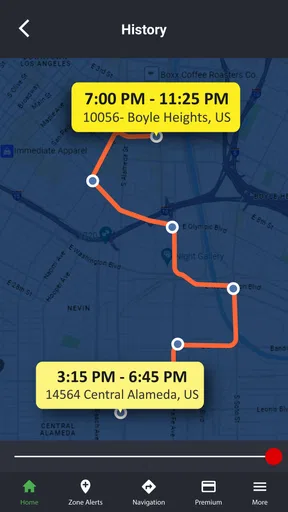
Track Any Phone offers both free and premium subscription options. The free version provides basic tracking features, while the premium version offers enhanced functionalities such as detailed location history and priority customer support. Subscription fees vary based on the chosen plan, and users can select the one that best suits their needs.
